
imhamburger 님의 블로그
RDS to DynamoDB 마이그레이션, 람다 실행시간 초과해결 본문
에러메세지
Status: Failed

Response:
{
  "errorType": "Sandbox.Timedout",
  "errorMessage": "RequestId: 8e26c2bc-bf18-42a7-b8af-cda92933f9a6 Error: Task timed out after 900.00 seconds"
}
MySQL에 저장된 데이터를 DynamoDB로 마이그레이션해야 했다. (이전글)
실시간성이 중요한 데이터는 아니었기 때문에 복잡한 스트리밍 파이프라인이 필요하다고 판단하지 않았다.
또한, 새로운 인프라를 구축하기보다 기존 AWS 리소스를 최대한 활용하고자 했다.
처음에는 AWS Lambda를 활용해 데이터를 옮기려 했으나, Lambda의 최대 실행 시간 제한(15분) 에 걸리며 Timeout 에러가 발생했다.
대용량 데이터를 한 번에 처리하기엔 Lambda가 적절하지 않았던 것이다.
사실 데이터가 얼마없어 될 줄 알았는데… 큰 착각이었다…..! 60메가바이트가 15분정도 걸리니 그게 최대인듯하다.
해결방법
구글링을 열심히 해 본 결과,
- EC2 인스턴스에서 직접 스크립트 실행
- → 실행 시간 제약이 없지만, 별도 인스턴스 관리가 필요하다는 단점이 있었다.
- AWS DMS (Database Migration Service)
- → 안정적인 서비스지만, 설정이 복잡하고 오버스펙이라는 판단.
- S3에 CSV 업로드 후 DynamoDB “Import from S3” 기능 활용
- → 추가 코드 없이 빠르게 마이그레이션 가능해 가장 단순한 접근이었다.
마지막 방법을 실제로 적용해보니 데이터 자체는 정상적으로 DynamoDB에 적재되었으나,
데이터 타입이 모두 문자열(String)로 변환되는 이슈가 있었다.
예를 들어, MySQL의 INT 필드는 DynamoDB에서 "123" 형태로 저장되어 타입 불일치 문제가 발생했다.
예전에 카카오에서 기술에 관한 유튜브를 본 적이 있었는데 그때 당시 chunk를 줘서 처리하는 방법이 어렴풋이 생각이 났다.
그래서 나도 같은방법을 쓸 수 있지 않을까 했다.
1. 전체 데이터를 한 번에 읽으면 너무 크니까, 예를 들어 10만 건이 있다면
→ 한 번에 5,000건씩 끊어서 처리한다.
→ 이렇게 끊어진 5,000건을 “chunk”라고 한다.
2. 각 chunk는 독립적으로 처리할 수 있으니까, 동시에 여러 개를 병렬로 실행시킬 수 있다.
→ 예를 들어 CPU가 10코어라면, 한 번에 10개의 chunk를 병렬로 DynamoDB에 넣는다.
3. offset은 ‘다음 chunk가 어디서부터 시작할지’ 알려주는 번호.
- 첫 번째 chunk: OFFSET 0 → LIMIT 5000
- 두 번째 chunk: OFFSET 5000 → LIMIT 5000
- 세 번째 chunk: OFFSET 10000 → LIMIT 5000
- 이런 식으로 offset을 증가시키며 데이터를 가져온다.
import pymysql
import boto3
from concurrent.futures import ThreadPoolExecutor, as_completed

# DB & DynamoDB 설정
mysql_conn = pymysql.connect(
    host='',
    user='',
    password='',
    database='',
    charset='utf8mb4',
    cursorclass=pymysql.cursors.DictCursor
)

dynamodb = boto3.resource('dynamodb')
table = dynamodb.Table('NPSListOddMonths')

CHUNK_SIZE = 5000  # 한 번에 처리할 row 수

def fetch_data(offset):
    with mysql_conn.cursor() as cursor:
        cursor.execute(f"SELECT * FROM NPSListOddMonths LIMIT {CHUNK_SIZE} OFFSET {offset}")
        return cursor.fetchall()

def process_chunk(rows):
    with table.batch_writer(overwrite_by_pkeys=['encryptCode']) as batch:
        for row in rows:
            item = {
                'companyID': int(row['companyID']),
                'registrationDate': str(row['registrationDate']) if row['registrationDate'] is not None else None,
                'companyName': str(row['companyName']),
                'employerIdNumber': int(row['employerIdNumber']),
                'joinStatusCode': int(row['joinStatusCode']) if row['joinStatusCode'] is not None else None,
                'lotNumberAddress': str(row['lotNumberAddress']) if row['lotNumberAddress'] is not None else None,
                'roadNameAddress': str(row['roadNameAddress']) if row['roadNameAddress'] is not None else None,
                'addressCode': int(row['addressCode']) if row['addressCode'] is not None else None,
                'companyTypeDivision': int(row['companyTypeDivision']) if row['companyTypeDivision'] is not None else None,
                'companyIndustryCode': int(row['companyIndustryCode']) if row['companyIndustryCode'] is not None else None,
                'companyIndustryName': str(row['companyIndustryName']) if row['companyIndustryName'] is not None else None,
                'applyAt': str(row['applyAt']) if row['applyAt'] is not None else None,
                'reRegisterAt': str(row['reRegisterAt']) if row['reRegisterAt'] is not None else None,
                'withdrawalAt': str(row['withdrawalAt']) if row['withdrawalAt'] is not None else None,
                'numberSubscriber': int(row['numberSubscriber']) if row['numberSubscriber'] is not None else None,
                'currentMonthAmount': int(row['currentMonthAmount']) if row['currentMonthAmount'] is not None else None,
                'numberNewSubscriber': int(row['numberNewSubscriber']) if row['numberNewSubscriber'] is not None else None,
                'numberLostSubscriber': int(row['numberLostSubscriber']) if row['numberLostSubscriber'] is not None else None,
                'encryptCode': str(row['encryptCode']) if row['encryptCode'] is not None else None
                }
            print(row['companyID'])
            batch.put_item(Item=item)

def main():
    # 전체 row count
    with mysql_conn.cursor() as cursor:
        cursor.execute("SELECT COUNT(*) as cnt FROM NPSListOddMonths")
        total_rows = cursor.fetchone()['cnt']

    offsets = range(0, total_rows, CHUNK_SIZE)
    print(offsets)

    # 병렬 실행
    with ThreadPoolExecutor(max_workers=10) as executor:  # 병렬 스레드 수 조절
        futures = [executor.submit(process_chunk, fetch_data(offset)) for offset in offsets]

        for future in as_completed(futures):
            try:
                future.result()
            except Exception as e:
                print(f"Error: {e}")

    print("✅ Migration completed.")

if __name__ == "__main__":
    main()
이걸 lambda에도 적용할 수 있다. chunk_size를 10000건으로 한정하여 10000건씩만 lambda가 처리하고 다음에도 10000건씩 처리하는 방식으로 변경했다.
그렇게하면 실행시간도 15분을 초과하지 않는다.
mysql-to-dynamodb-controller 함수
import boto3, json, pymysql

def lambda_handler(event, context):
    conn = pymysql.connect(
        host='',
        user='',
        password='',
        database='',
        port = 3306,
        charset='utf8mb4'
    )
    with conn.cursor() as cur:
        cur.execute("SELECT COUNT(*) FROM NPSListOddMonths")
        total_rows = cur.fetchone()[0]

    chunk_size = 10000
    lambda_client = boto3.client('lambda')

    for offset in range(0, total_rows, chunk_size):
        payload = {
            'offset': offset,
            'limit': chunk_size
        }
        lambda_client.invoke(
            FunctionName='mysql-to-dynamodb-worker',
            InvocationType='Event',  # 비동기 실행
            Payload=json.dumps(payload)
        )

    return {"status": "triggered", "total_rows": total_rows}
mysql-to-dynamodb-worker 함수
import boto3, pymysql, os

def lambda_handler(event, context):
    offset = event['offset']
    limit = event['limit']

    conn = pymysql.connect(
        host=os.environ['MYSQL_HOST'],
        user=os.environ['MYSQL_USER'],
        password=os.environ['MYSQL_PASSWORD'],
        database=os.environ['MYSQL_DB'],
        charset='utf8mb4'
    )
    cursor = conn.cursor(pymysql.cursors.DictCursor)

    cursor.execute(f"SELECT * FROM NPSListOddMonths LIMIT {limit} OFFSET {offset}")
    rows = cursor.fetchall()

    dynamodb = boto3.resource('dynamodb')
    table = dynamodb.Table('NPSListOddMonths')

    with table.batch_writer(overwrite_by_pkeys=['encryptCode']) as batch:
        for row in rows:
            item = {
                'companyID': int(row['companyID']),
                'registrationDate': str(row['registrationDate']) if row['registrationDate'] is not None else None,
                'companyName': str(row['companyName']),
                'employerIdNumber': int(row['employerIdNumber']),
                'joinStatusCode': int(row['joinStatusCode']) if row['joinStatusCode'] is not None else None,
                'lotNumberAddress': str(row['lotNumberAddress']) if row['lotNumberAddress'] is not None else None,
                'roadNameAddress': str(row['roadNameAddress']) if row['roadNameAddress'] is not None else None,
                'addressCode': int(row['addressCode']) if row['addressCode'] is not None else None,
                'companyTypeDivision': int(row['companyTypeDivision']) if row['companyTypeDivision'] is not None else None,
                'companyIndustryCode': int(row['companyIndustryCode']) if row['companyIndustryCode'] is not None else None,
                'companyIndustryName': str(row['companyIndustryName']) if row['companyIndustryName'] is not None else None,
                'applyAt': str(row['applyAt']) if row['applyAt'] is not None else None,
                'reRegisterAt': str(row['reRegisterAt']) if row['reRegisterAt'] is not None else None,
                'withdrawalAt': str(row['withdrawalAt']) if row['withdrawalAt'] is not None else None,
                'numberSubscriber': int(row['numberSubscriber']) if row['numberSubscriber'] is not None else None,
                'currentMonthAmount': int(row['currentMonthAmount']) if row['currentMonthAmount'] is not None else None,
                'numberNewSubscriber': int(row['numberNewSubscriber']) if row['numberNewSubscriber'] is not None else None,
                'numberLostSubscriber': int(row['numberLostSubscriber']) if row['numberLostSubscriber'] is not None else None,
                'encryptCode': str(row['encryptCode']) if row['encryptCode'] is not None else None
            }
            batch.put_item(Item=item)

    cursor.close()
    conn.close()

    return {'status': 'done', 'rows': len(rows), 'offset': offset}
근데 위에 코드로 진행했을 때 데이터가 유실되는 걸 발견했다.
그래서 유실되지 않게 safe_batch_write방지코드를 추가하였다.
아래는 로컬에서 먼저 테스트를 한 코드이다.
import boto3
import pymysql
import time
from concurrent.futures import ThreadPoolExecutor, as_completed
import json

# ===== 기본 설정 =====
CHUNK_SIZE = 5000
MAX_WORKERS = 10
MAX_RETRIES = 5
TABLE_NAME = "NPSInfoOddMonths"

# ===== MySQL 연결 정보 =====
def get_mysql_conn():
    return pymysql.connect(
        host='',
        user='',
        password='',
        db='',
        charset='utf8mb4',
        cursorclass=pymysql.cursors.DictCursor
    )

# ===== DynamoDB 클라이언트 =====
dynamodb = boto3.resource('dynamodb')
table = dynamodb.Table(TABLE_NAME)

# ===== 안전한 batch write (재시도 포함) =====
def safe_batch_write(items):
    request_items = {
        TABLE_NAME: [{'PutRequest': {'Item': item}} for item in items]
    }

    for attempt in range(MAX_RETRIES):
        try:
            response = dynamodb.batch_write_item(RequestItems=request_items)
            unprocessed = response.get('UnprocessedItems', {})

            if not unprocessed:
                return

            print(f"{len(unprocessed[TABLE_NAME])}개 미처리 → 재시도 {attempt+1}회")
            request_items = unprocessed
            time.sleep(2 ** attempt)  # exponential backoff

        except Exception as e:
            print(f"Batch write error (attempt {attempt+1}): {e}")

            # 실패한 아이템을 로그 파일에 저장
            with open("failed_items.log", "a", encoding="utf-8") as f:
                f.write(json.dumps(items, ensure_ascii=False) + "\n")

            # 실패 시 바로 중단하지 않고 다음 chunk 계속
            return

    # 재시도 후에도 실패한 경우
    if unprocessed:
        print(f"여전히 실패 항목 존재: {len(unprocessed[TABLE_NAME])}개")

        # 마지막으로 남은 실패 데이터도 로그에 저장
        with open("failed_items.log", "a", encoding="utf-8") as f:
            f.write(json.dumps(unprocessed, ensure_ascii=False) + "\n")


# ===== 한 chunk 처리 함수 =====
def process_chunk(offset):
    conn = get_mysql_conn()
    with conn.cursor() as cursor:
        cursor.execute(f"SELECT * FROM NPSInfoOddMonths LIMIT {CHUNK_SIZE} OFFSET {offset}")
        rows = cursor.fetchall()
    conn.close()

    if not rows:
        print(f"⏩ offset={offset} 데이터 없음, skip")
        return

    print(f"🚀 offset={offset} 처리 시작 ({len(rows)} rows)")

    items = []
    for row in rows:
        if row['companyID'] is None or row['registrationDate'] is None:
            continue

        item = {
                'companyID': int(row['companyID']),
                'registrationDate': str(row['registrationDate']) if row['registrationDate'] is not None else None,
                'companyName': str(row['companyName']),
                'employerIdNumber': int(row['employerIdNumber']),
                'joinStatusCode': int(row['joinStatusCode']) if row['joinStatusCode'] is not None else None,
                'lotNumberAddress': str(row['lotNumberAddress']) if row['lotNumberAddress'] is not None else None,
                'roadNameAddress': str(row['roadNameAddress']) if row['roadNameAddress'] is not None else None,
                'addressCode': int(row['addressCode']) if row['addressCode'] is not None else None,
                'companyTypeDivision': int(row['companyTypeDivision']) if row['companyTypeDivision'] is not None else None,
                'companyIndustryCode': int(row['companyIndustryCode']) if row['companyIndustryCode'] is not None else None,
                'companyIndustryName': str(row['companyIndustryName']) if row['companyIndustryName'] is not None else None,
                'applyAt': str(row['applyAt']) if row['applyAt'] is not None else None,
                'reRegisterAt': str(row['reRegisterAt']) if row['reRegisterAt'] is not None else None,
                'withdrawalAt': str(row['withdrawalAt']) if row['withdrawalAt'] is not None else None,
                'numberSubscriber': int(row['numberSubscriber']) if row['numberSubscriber'] is not None else None,
                'currentMonthAmount': int(row['currentMonthAmount']) if row['currentMonthAmount'] is not None else None,
                'numberNewSubscriber': int(row['numberNewSubscriber']) if row['numberNewSubscriber'] is not None else None,
                'numberLostSubscriber': int(row['numberLostSubscriber']) if row['numberLostSubscriber'] is not None else None
        }
        items.append(item)

        # DynamoDB는 25건 단위로 요청 제한
        if len(items) == 25:
            safe_batch_write(items)
            items = []

    # 마지막 잔여 데이터 처리
    if items:
        safe_batch_write(items)

    print(f"offset={offset} 완료 ({len(rows)} rows)")

# ===== 메인 실행 =====
def main():
    conn = get_mysql_conn()
    with conn.cursor() as cursor:
        cursor.execute("SELECT COUNT(*) AS cnt FROM NPSInfoOddMonths")
        total_rows = cursor.fetchone()['cnt']
    conn.close()

    offsets = range(0, total_rows, CHUNK_SIZE)
    print(f"총 {total_rows} rows, {len(offsets)}개의 청크로 분할")

    with ThreadPoolExecutor(max_workers=MAX_WORKERS) as executor:
        futures = [executor.submit(process_chunk, offset) for offset in offsets]
        for future in as_completed(futures):
            try:
                future.result()
            except Exception as e:
                print(f"Error in thread: {e}")

    print("Migration completed safely!")

if __name__ == "__main__":
    main()
결과
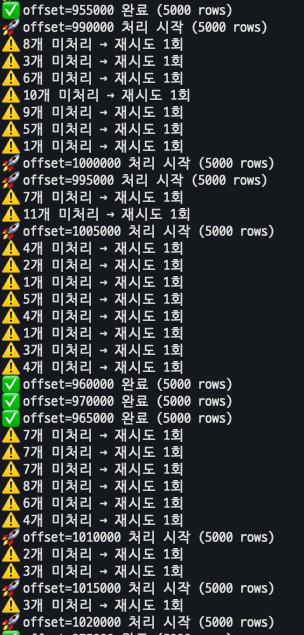
- ThreadPoolExecutor 사용 전: 1시간당 4,000건 처리
- ThreadPoolExecutor 사용 후: 1시간에 4,000,000건(= 1GB 데이터 전부) 처리
즉, 1,000배 빨라졌다.
참고한 자료
'끄적끄적' 카테고리의 다른 글
| DynamoDB: The provided key element does not match the schema (0) | 2025.12.19 |
|---|---|
| DynamoDB - LastEvaluatedKey 이해하기 (0) | 2025.11.23 |
| RDS to DynamoDB 마이그레이션 리서치 (0) | 2025.10.26 |
| PostgreSQL WITH ORDINALITY 사용 (0) | 2025.10.10 |
| 루커스튜디오 날짜 중복 문제 해결하기 (Feat.Google Sheet 조인) (0) | 2025.09.24 |
